Expand and optimize your processes from all industries
Microsoft Dynamics, SAP, DATEV – these and many other systems can be easily linked with enaio®. The interface compatibility of the ECM solution ensures that the creation and management of data is automated and synchronized. For example, users can access transactions and posting records directly from their financial accounting software or archive analog incoming invoices after scanning directly in the desired digital registers and folders.
Or incoming invoices are booked in the ERP system within the framework of workflow procedures and forwarded to the responsible departments via enaio®. All information is managed centrally and is available as required – whether via SOAP, REST or COM. With the wide range of available interfaces for various business applications, almost any requirement can be implemented in the shortest possible time. So you can easily integrate enaio® into your existing IT environment and extend and adapt it according to your individual ideas.
No parallelism of the systems: Users continue to work in their proven working environment.
Whether ERP or FiBu – linked with enaio®, workflows are optimized and comprehensively documented.
Less effort for administration, more time resources – your development department will thank you for it.
API – enaio® client-api
As an object-oriented OLE/COM programming interface, the interface can be used to implement specific tasks. The user can intervene with their own code in actions of enaio®.
Server-API – enaio® server-api
The interface can be used for integration and coupling of enaio® into any system on any platform. One component is the web service interface, which allows document retrieval via URL.
LDAP interface– enaio® directory-services
This component enables the transfer of users from LDAP directories and authentication on the LDAP server. This allows the user administration of enaio® to be synchronized with a Microsoft Active Directory.
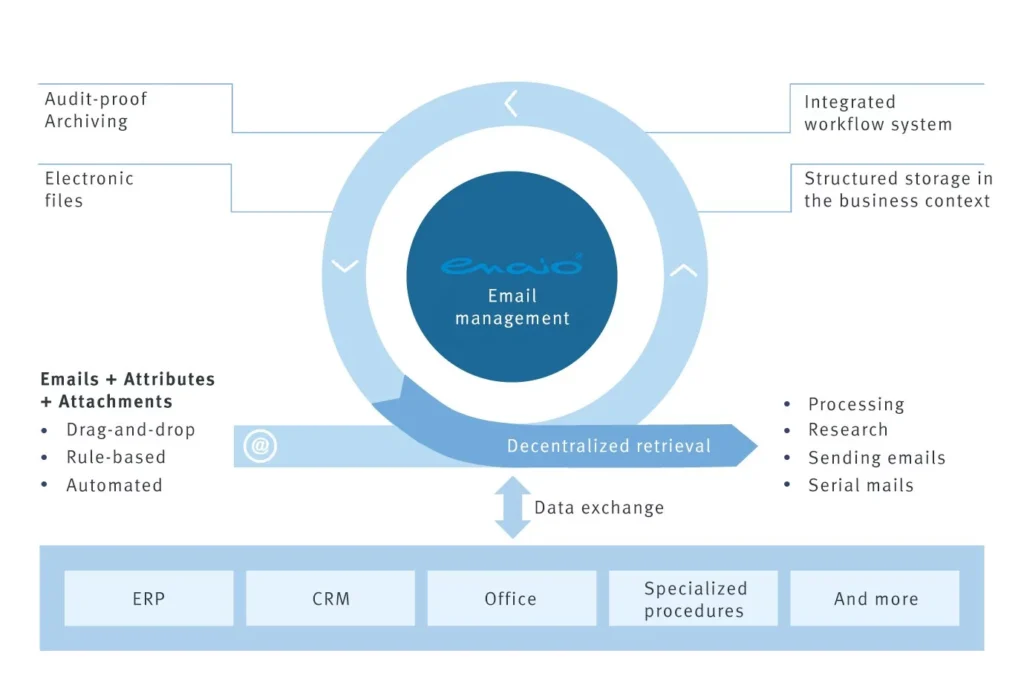
E-mail archiving – enaio® mail-archiver
Automatically archive incoming and outgoing emails – no problem with this module. E-mails are created unchanged in a mailbox folder in enaio®. Freely configurable workflows can also be started.
Exchange – enaio® exchange
enaio® exchange enables the transfer of e-mails including their attachments from the Microsoft Exchange Server. Complete e-mails, as well as their attachments, can be transferred to enaio® for archiving.
Search in Outlook – enaio® search
enaio® search provides an Outlook extension with which the search of already archived e-mail objects is guaranteed. The search and processing of archived e-mails is thus possible without using enaio®.
Microsoft Dynamics NAV – enaio® dynamics-nav
With the combination of Microsoft Dynamics NAV and enaio®, incoming and outgoing documents can be electronically stored, organized and archived in enaio®. For this purpose, enaio® can be used to research the entire document inventory.
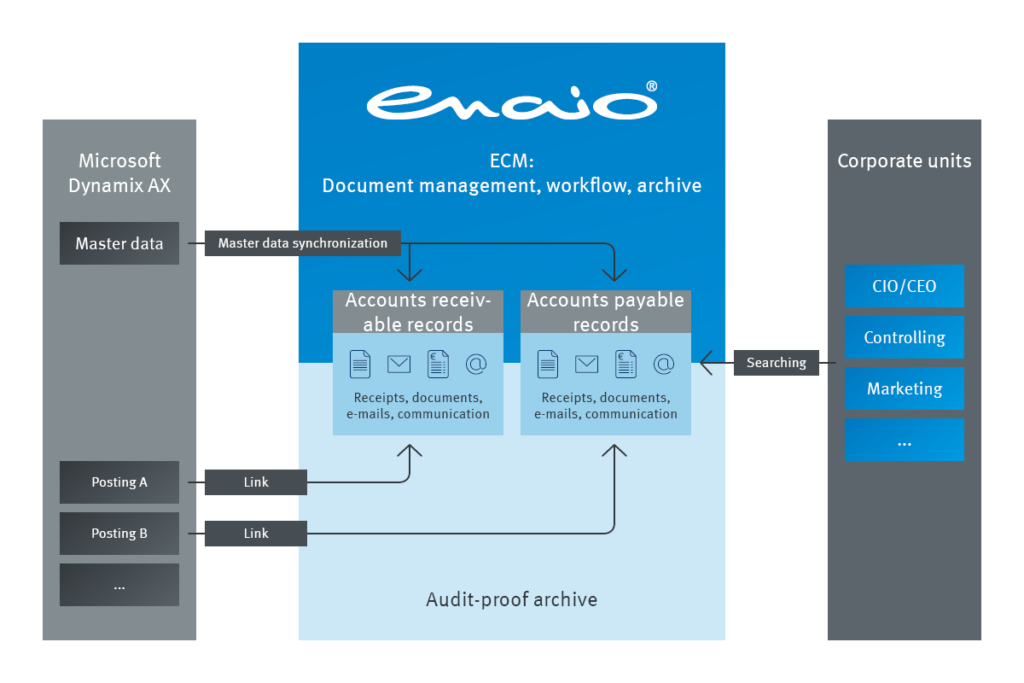
Microsoft Dynamics AX – enaio® dynamics-ax
Documents from Microsoft Dynamics AX are archived in enaio® and can be displayed directly from Dynamics AX. External documents can be scanned, automatically indexed by OCR, ICR or barcode recognition, validated and stored in the right place in enaio®.
SAP ArchiveLink®
enaio® supports SAP ArchiveLink® interface via a certified archive interface. This enables complete data exchange with SAP applications. Documents and e-mails are captured externally in enaio® and displayed directly in SAP, linking enaio® documents with the appropriate business object.
SAP connectors
The enaio® SAP connectors are the key components for integrating enaio® into SAP ERP. The enaio® erp-s connectors make it very easy to integrate applications based on enaio® into SAP.


LOCATIONS