For corporate finance and accounting departments, the daily influx of countless invoices through various channels poses a challenge. Using software for digital invoice processing not only offers the opportunity to reduce costs and workload, but also helps ensure compliance with legal requirements. While electronic invoicing has been mandatory for public administration since 2017, this requirement will be extended to all taxable domestic B2B transactions starting in January 2025. This underscores the need for companies to digitize their accounting processes and prepare for upcoming regulatory changes.
Table of contents
Incoming invoice processing is a key component of financial accounting and refers to the process by which an organization receives an invoice from a supplier or service provider. This can be done in various ways, such as by mail, e-mail, or through electronic platforms. It is important to note that every incoming invoice must be properly documented and processed in order to maintain an overview of financial obligations and ensure accurate bookkeeping in accordance with legal requirements.
Invoices can be received in various formats: as a traditional paper invoice, as a digital file, or as an electronic invoice in accordance with the EU directive. It is important to understand the differences between these invoice formats to ensure efficient and legally compliant invoice processing.
A traditional method of receiving invoices, in which the invoice is sent in printed form by mail. It must be entered and processed manually.
An invoice that is received and processed in a digital format, such as a PDF or image file. Scanned paper invoices are also digital invoices. Although they are in digital form, they must be scanned using OCR technology before they can be automatically processed in accounting software or an enterprise content management (ECM) system. This method is more efficient than paper invoices because it allows for faster delivery and easy electronic storage.
An invoice in a structured, machine-readable format such as XRechnung or ZUGFeRD.
An e-invoice has three main features:
These invoices are designed for automatic processing in accounting and ECM systems, which enable efficient management, archiving, and automation of the invoice workflow. This is the most efficient method for receiving invoices, which not only saves time and money but also reduces human error in invoice processing.
Under the Growth Opportunities Act, the formats for e-invoices that will be relevant in Germany starting in 2025 are clearly defined. Valid formats must comply with the requirements of European Standard EN 16931. These are implemented by a number of standards that differ technically. In Germany, the ZUGFeRD and XRechnung formats are the most widely used:
ZUGFeRD is a hybrid format that includes both a machine-readable XML file and a human-readable PDF file. It is vendor-neutral and was developed by the German Electronic Invoicing Forum (FeRD). ZUGFeRD allows the XML data set to be embedded in a PDF, providing a visual component for the user while also making the machine-readable invoice data available to the processing application.
XRechnung is a purely XML-based format developed by the Coordination Office for IT Standards (KoSIT). It is also vendor-neutral and focuses on the machine-readability of invoice data, without offering an embedded display component like ZUGFeRD. XRechnung is particularly well-suited for companies that work with public administration.
There are several delivery methods for e-invoices that businesses can use to ensure efficient and secure processing. The most common transmission methods include:
A common method is to send e-invoices as attachments in an e-mail. These e-mails may contain machine-readable formats such as XRechnung or ZUGFeRD.
Many companies and government agencies offer specialized web portals through which suppliers can upload their e-invoices (such as the ZRE in Germany and the SDI in Italy).
Some companies rely on direct system-to-system integrations, in which e-invoices are sent directly from the supplier’s ERP system to the customer’s ERP system. This requires close IT cooperation among the companies involved.
PEPPOL is a network that enables the secure exchange of e-invoices and other business documents within Europe. Unlike traditional EDI, communication between the sender and recipient of an invoice takes place indirectly via certified access points. Unlike traditional EDI, an organization need only establish a connection with a Peppol access point of its choice and can use it to exchange documents with any business partner that uses a different Peppol access point (four-corner model).
E-invoicing and EDI are both digital processes that play a central role in modern business communication, though they have different focuses:
E-invoicing (electronic invoicing) is the electronic form of invoicing. It enables faster, more efficient, and more cost-effective invoice processing compared to traditional, paper-based methods. The e-invoicing regulation has been mandatory for public contracts since 2017, and since January 2025, invoices between domestic businesses must be sent exclusively in electronic form.
EDI (Electronic Data Interchange), on the other hand, is a broad term that refers to the exchange of a wide variety of business documents and information between companies in a standardized electronic format. This includes not only invoices, but also purchase orders, delivery notes, and other business-related documents. EDI aims to automate and optimize all business transactions between companies by minimizing manual intervention and enhancing data integrity.

In 2025 an expanded requirement to use electronic invoices (e-invoices) was introduced in Germany. This regulation applies in particular to the B2B sector. The e-invoicing requirement means that companies are required to issue and transmit their invoices in electronic format for taxable transactions within Germany.
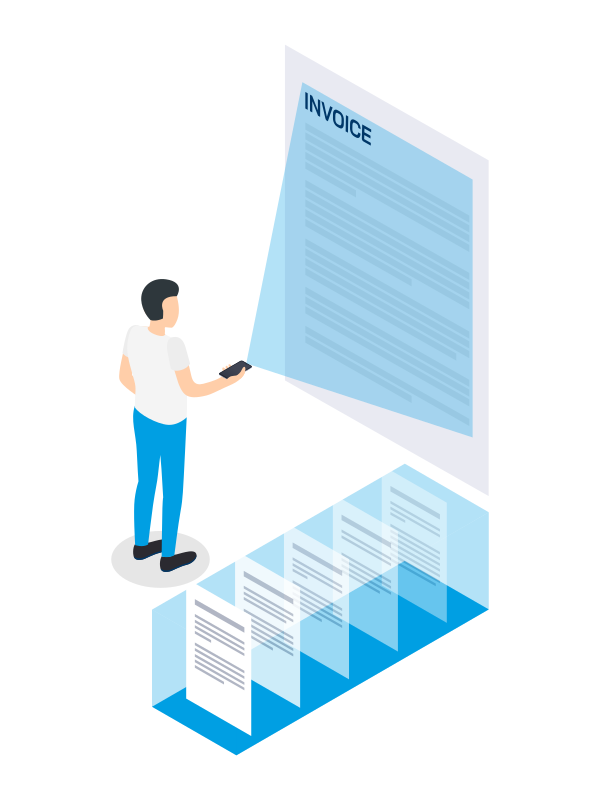
This change is intended to increase efficiency in accounting, reduce paper consumption, and improve transparency and compliance in business transactions. For businesses, this means they must adapt their internal processes and systems accordingly to enable the creation and processing of e-invoices. Implementing a software solution or customizing existing systems can help you achieve this.
The 2025 e-invoicing requirement promotes the further digitization of business processes and the harmonization of electronic invoice exchange within the European Union.
With digital incoming invoice processing software, you can automate and optimize your invoice processing, thereby increasing the efficiency and effectiveness of your business processes. You can automatically capture incoming invoices, use software to extract and verify invoice data, forward it to a designated group of people for final review, then archive it in compliance with GoBD standards, and quickly retrieve the data even months or years later. Your benefits in detail:
For example, when you process invoices digitally using a DMS, you reduce processing time, which leads to direct cost savings. A study by the Federal Ministry of the Interior (BMI), conducted by Goethe University Frankfurt, showed several years ago that processing digital invoices takes up to two-thirds less time per invoice than processing paper invoices. While paper invoices took an average of 22 minutes to process, digital processing took only 5 to 7 minutes per invoice. Thanks to modern invoice processing software or ECM systems, this time can be reduced even further today. In addition, digital invoice archiving eliminates the costs associated with printing, mailing, and physical storage.

By digitizing your invoice receipt, you can reduce manual processes. This results in faster processing of your invoices and also allows you to use your human resources more efficiently. By digitizing the entire invoice processing workflow – from invoice capture and data extraction to workflow-driven checks and approvals – you can minimize administrative overhead and boost the productivity of your finance department.
Digitizing your incoming invoices not only speeds up processing but also makes it more accurate. In an ECM system, the invoice processing software uses intelligent validation routines. These routines compare invoice data with stored purchase orders and contract terms, enabling immediate validation. If the information matches, the system automatically forwards the invoice for final review and approval, taking into account predefined approval hierarchies. Invoices that are incomplete or contain errors are flagged and submitted to a human reviewer for verification. This allows you to detect errors more quickly and thus avoid potential damage or financial losses.
The invoice processing software allows you to customize approval workflows to meet your specific needs. This customized approach enables faster invoice processing. Even when key team members are away, automatic forwarding and notifications ensure that there are no delays, preventing deadlines from being missed or forgotten. The result is a seamless, lag-free process that streamlines your financial management and gives you greater control over the entire invoice processing workflow.
A digital invoice workflow helps you meet legal regulations and compliance requirements. If you use modern invoice processing software within an ECM system, you will have complete and audit-proof documentation of your invoices. Every step in the process is automatically logged, enabling transparent and complete traceability. This not only simplifies internal and external audits, but also minimizes the risk of compliance violations and strengthens the trust of your stakeholders.
Digital invoice processing improves collaboration within the company. An advanced ECM system enables teams to collaborate on invoices and relevant documents, regardless of their location. This promotes an efficient and coordinated way of working. For example, team members can review documents in real time, add comments, or forward documents for review within the workflow with the click of a button. This improves internal communication and coordination between different departments.
By digitizing your incoming invoices, you are helping to make your company more sustainable. According to the German Federal Environment Agency, producing 1 kg of paper requires about 2.2 kg of wood, 50 liters of water, and 5 kWh of energy, and chemicals are also used in the process. By using digital invoice processing, you can drastically reduce your paper consumption – and thus your carbon footprint – while also demonstrating to customers your commitment to environmental responsibility.
The more you digitize your invoice processing workflows, the better you will be able to leverage new technologies such as artificial intelligence and integrate machine learning into your processes. These technologies can be used, for example, for automated data validation. By taking this approach, you will help ensure your company’s long-term competitiveness and innovative strength.
The digital invoice processing system is fundamentally changing the way your incoming invoices are handled. The receipt of an invoice triggers the invoicing workflow and sets a series of automated steps in motion.
Digital invoices are typically received via electronic channels such as e-mail or EDI (Electronic Data Interchange). Any remaining invoices that are still received by mail are scanned and digitized. PDF or Word invoices received via e-mail are first extracted by the software and then processed. If the invoices are already in electronic format, such as XRechnung or ZUGFeRD, the software can process them automatically.
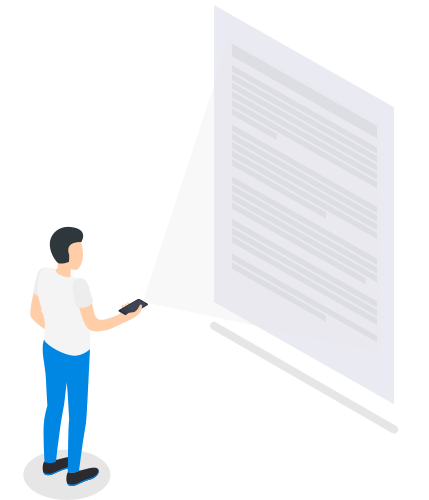
To read PDF invoices and extract the information they contain, you can use software solutions that rely on OCR (Optical Character Recognition) technology. OCR specializes in recognizing printed text and converting it into machine-readable data. This software-based data extraction saves time and minimizes errors that can often occur during manual data entry. The extracted data is then converted into a format suitable for further processing by your accounting software.
To streamline invoice processing, e-invoice formats such as XRechnung or ZUGFeRD can be used. This eliminates the need for OCR-based data capture, as the invoice data is already in a standardized format that can be processed immediately. This significantly improves the accuracy and efficiency of invoice processing.
The invoice data is then validated, which involves comparing the invoice information with internal databases and purchasing data. For example, the software automatically checks whether the supplier is registered, whether the invoice has been submitted twice, and whether the amounts match the order details. This comparison makes it possible to efficiently and reliably identify duplicates, discrepancies, or irregularities in the invoice data. This helps identify any discrepancies in supplier details or inconsistencies in order data. Sources of error are identified early on, and delays in the payment process are avoided.
By using invoice processing software in your invoicing workflow, you can set up automated approval workflows that significantly reduce time and effort. Based on predefined rules, the system forwards your invoices to the appropriate individuals or departments for review and approval.
The substantive review verifies whether the invoice is justified, whether the payment corresponds to the service provided, whether there are any discrepancies in quantity or service, etc. If the relevant department identifies any discrepancies, inquiries or corrections can be initiated and managed directly through the workflow. You can also set deadlines for the subsequent steps in the workflow to ensure that neither cash discounts nor payment terms are missed.
Depending on the organizational chart, the final step in the digital invoice approval process is performed by the budget managers, who approve the payment of the invoice and the charging of a cost center.
The time-consuming process of manually forwarding documents and following up is completely eliminated, as all employees throughout the entire process chain are always kept informed of the current status of the workflow.

It is precisely in the final step – account assignment – that one thing becomes particularly clear: The more information is recorded on the invoice, the easier it is for the accounting department to review it. And this makes it easier to determine where the amount listed on the invoice should be posted. Integrating with the ERP system greatly simplifies these processes. Ideally, a digital invoice should already include all relevant information, such as the date, document number, account number and description, and any other necessary details.
Professional digital invoice processing solutions based on DMS or ECM offer high compatibility with common ERP (Enterprise Resource Planning) systems, ensuring seamless and efficient data transfer. Once approved, the invoice data is automatically transmitted to your accounts payable department without any manual intervention.
Just like paper invoices, you must archive digital invoices in accordance with legal requirements. This includes ensuring authenticity, integrity, and legibility throughout the entire period required by law. Fully integrated ECM software solutions support secure long-term archiving and compliance with regulatory requirements.
GoBD-compliant archiving is an essential part of your accounting and document management. It ensures that all business-related documents, particularly invoices, are stored in accordance with the principles governing the proper maintenance and retention of books, records, and documents in electronic form, as well as data access (GoBD). This means that your invoices must be complete, tamper-proof, and retrievable within a reasonable period of time at all times. As a general rule, you must keep digital invoices for ten years.
Implementing a GoBD-compliant archiving system not only ensures compliance with these legal requirements but also provides transparency and security for your financial records. This ensures that you are prepared for tax audits and minimizes the risk of penalties resulting from compliance violations.
If you digitize invoices (e.g., using software) and store and make them available centrally via DMS or ECM systems, cross-departmental teams can access older invoices and related documents at any time and from anywhere.
Digital incoming invoice processing also offers you the advantage of detailed analyses and reports. Transparent processes and protocols help you manage your supplier relationships more effectively.
The foundation of digital invoice processing is always software capable of receiving, processing, forwarding, and archiving invoices in various formats (e.g., PDF, e-invoices).
enaio® by OPTIMAL SYSTEMS is a reliable solution for processing and exchanging digital invoices. enaio® stands for "enterprise all-in-one," which means that all important and relevant data and information across the entire company is centrally collected and made available through the software. As a result, enaio® goes beyond simple invoice processing software to offer a comprehensive ECM (Enterprise Content Management) solution.
enaio® captures incoming invoices and automatically forwards them, regardless of whether they are structured (XRechnung, ZUGFeRD) or unstructured (standard PDFs).
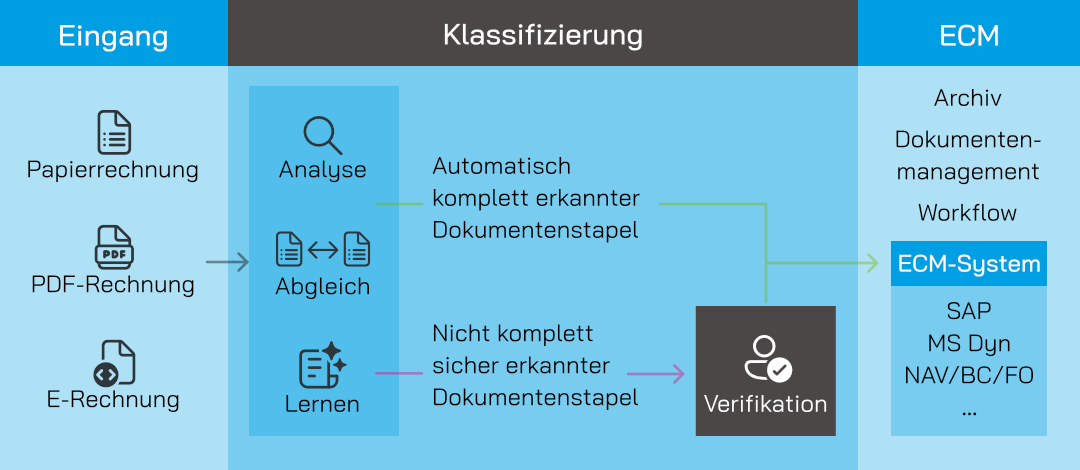
Using OCR technology, invoice data such as the invoice recipient, sender, VAT ID number, invoice date, service date, totals, VAT, discounts, etc., is extracted and matched with the vendor master data from your ERP or accounting system. The software's analysis and logic tool verifies that the data has been read correctly and forwards the invoices to a workflow for further processing. If there are any discrepancies – for example, if a VAT number is missing or the sales tax rate is incorrect – the invoice is forwarded to the verification center for review. The digital invoice reader handles the bulk of the work in this step.
You or the appropriate personnel in the relevant department can approve the invoice via enaio® client. This allows you to access the supplier file directly to obtain the information needed for approval. Here you will find orders, delivery notes, and supporting documents. Depending on the action taken – approval, request for clarification, or rejection – the appropriate workflows are initiated.
You can configure the workflow to suit your needs: single-step, two-step, or multi-step (business review, technical review, payment approval). Approval can also be granted via the enaio® app on a smartphone or tablet.
The invoice is then transferred to the accounting system (e.g., SAP, DATEV, or Microsoft Dynamics 365 Business Central) for payment, where it can be posted directly.
Every step is logged, and the log is saved as a PDF document, making the process transparent and traceable – even for future audits by the accounting department.

The key features of enaio®:
Integrates with ERP and financial accounting systems
Invoice verification and plausibility checks
Automated recognition and classification of captured documents
Set-up of dunning and retention periods
Integrated workflow system
Supports various invoice formats
Audit-proof archiving
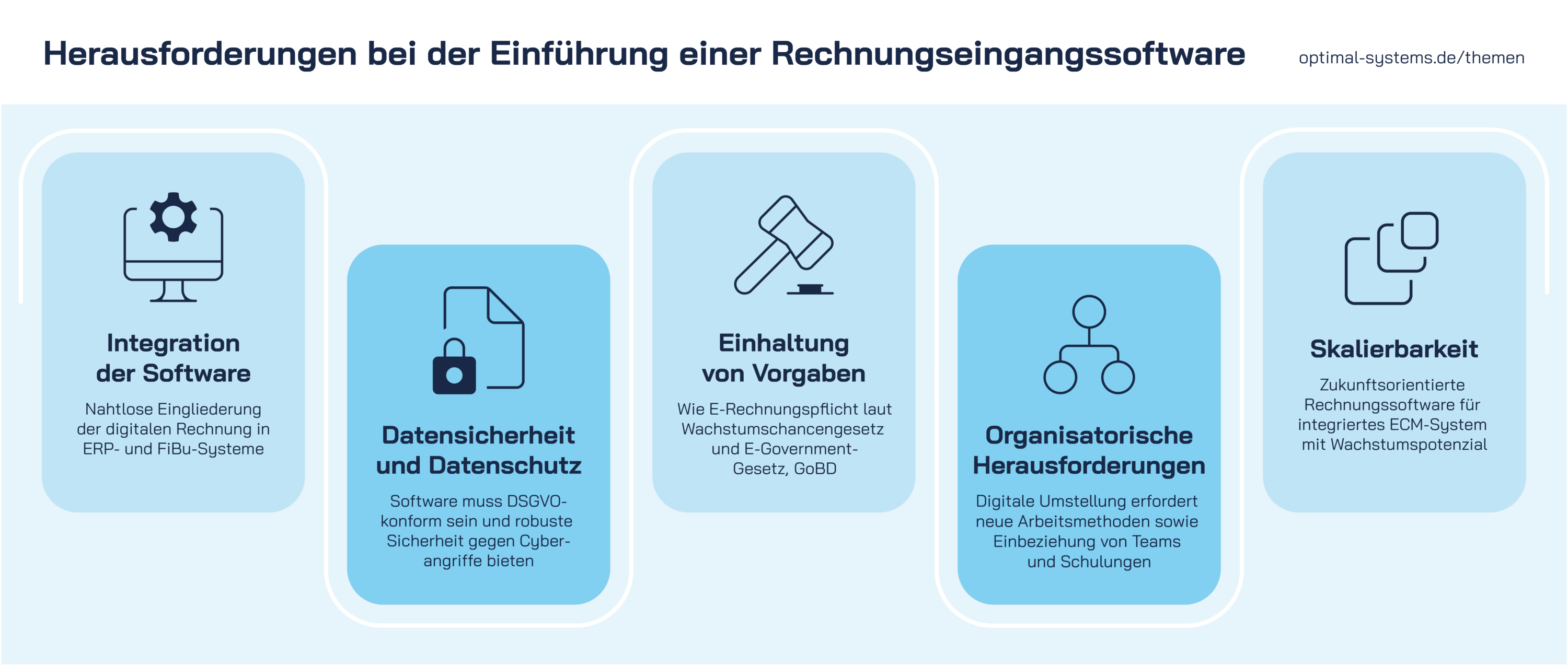
A key factor in software designed to optimize invoice processing is its seamless integration into your existing IT infrastructure. Only this enables an automated data flow between systems, which minimizes manual intervention and improves process efficiency.
When selecting your software or ECM system, therefore, make sure that the following requirements are met:
Special interfaces (APIs) to your ERP system (e.g., SAP, Microsoft Dynamics 365 Business Central, or FO) as well as DATEV are available.
Integration with e-mail systems is possible.
Web service capability is in place.
If you want to do more than just automate your invoice processing – if you’re aiming to comprehensively optimize your company’s entire procurement process – an integrated process based on the purchase-to-pay concept is essential. This comprehensive process integrates every step from ordering to payment, enabling a seamless digital experience.
In the P2P model, the demand-driven and payment-driven processes are combined into a single procurement process:
The Purchase section covers all steps from the initial requisition to the receipt of goods. This includes review, approval, ordering, order confirmation, and incoming goods inspection.
The Pay section, on the other hand, focuses on the payment aspect of the procurement process. It begins with the receipt of invoices from suppliers and ends with payment. This section covers the preparation of invoices for processing, invoice processing, reconciliation with the purchase order, invoice approval, and finally payment.

The main goal of the P2P process is to simplify complex workflows, increase transparency, and prevent media breaks between individual steps. Without digital integration, purchasing, accounting, and finance departments can quickly lose track of things. Digital purchase-to-pay solutions automate the entire data exchange process from start to finish – that is, from the purchase requisition to the archiving of the invoice.
Digital invoice processing is a key component of the purchase-to-pay process. If you want to make this process efficient and transparent, OPTIMAL SYSTEMS’ enaio® is an excellent choice. ECM technology, powered by artificial intelligence, replaces your manual, step-by-step processes with a comprehensive digital approach.

The starting point: manual invoice processing was causing a backlog
At Reservix, the manual processing of invoices was leading to an ever-increasing drain on resources, effort, and costs. At the modern company, every incoming invoice was entered manually, and every new supplier was added to the system manually. In addition, invoices often had to be transferred manually and laboriously from one location to another.
"The effort involved was enormous and no longer reasonable," explains Marcel Imschweiler, operations team leader in the Finance and Accounting department at Reservix.
The solution: the enaio® DMS solution by OPTIMAL SYSTEMS
The search for a document management system was conducted on a project-by-project basis. Software functionality was a particularly important factor in the selection process, as was the quality of support provided by the vendor. That is why Reservix chose OPTIMAL SYSTEMS.
enaio® transformed the company's analog invoice receipt into a fully digital process:
The result: enaio® enables location-independent processing
The project, which lasted about six months, was successfully completed in October 2022.
Marcel Imschweiler of Reservix is enthusiastic: "Automated invoice processing enables more flexible, location-independent processing – 80 percent of the data is recognized automatically, resulting in significant time savings." The investment in the DMS software has already paid off for Reservix. Imschweiler expected the costs to be recouped within two to three years.
The automation of the digital invoicing process also extends to the creation of new vendors. To this end, OPTIMAL SYSTEMS developed a customized solution, including a new interface for transferring master data to DATEV.
It is important that the digital invoice processing software can be seamlessly integrated into existing business software, such as ERP or financial accounting systems. Of course, a lot can be programmed (or reprogrammed) using interfaces, but it works more simply and efficiently if standard interfaces – such as those for SAP – are already in place.
Make sure that the software solution you choose complies with the strict requirements of the General Data Protection Regulation (GDPR) and offers robust security measures against cyberattacks, data breaches, and unauthorized access. This includes encryption technologies, regular security updates, and strict access controls to ensure that sensitive financial data and personal information are protected at all times.
In Germany, as in many other European countries, the federal government’s E-Government Act sets forth the specific regulations governing the implementation of electronic government services. In addition, there are regulations such as the GoBD that define the requirements for the digital archiving of invoices.
Since 2025, a mandatory e-invoicing requirement for B2B transactions has been in effect under the Growth Opportunities Act. This means that companies are required to exchange domestic B2B invoices in a structured, electronic format. The aim of this regulation is to increase efficiency and transparency in accounting and to further advance the digitization and automation of business processes. Companies had to prepare for these changes well in advance and adapt their systems and processes accordingly to comply with legal requirements and take advantage of the benefits of e-invoicing.
The transition to digital processes often requires a change in established work methods. These familiar processes must be discarded, and workflows may need to be completely reimagined and redesigned. Involve teams in the planning and transition process early on, and offer training and professional development on how to use the software both during and after the transition.
Think ahead and choose invoice processing software that integrates with an ECM system and offers the scalability needed to support your growth.
Digital invoice processing refers to the process of receiving and processing invoices in digital form. This includes invoices sent via e-mail as PDF or image files, as well as scanned paper invoices. Digitally transmitted invoices are parsed using software – often supported by OCR (Optical Character Recognition) technology – and automatically integrated into workflows for further processing. This allows for more efficient, faster, and more accurate processing compared to manual data entry.
Electronic invoice receipt refers to the process of receiving and processing invoices in a structured, machine-readable format. These invoices are not sent as PDF or image files, but in formats such as XRechnung or ZUGFeRD, which were specifically developed for automatic processing in accounting and ECM systems. Electronic invoices can be received via e-mail attachments or specialized data transfer methods such as EDI (Electronic Data Interchange), enabling seamless integration and efficient processing.
The XRechnung and ZUGFeRD invoicing standards are formats for electronic invoices that are widely used in Germany. They facilitate the exchange and processing of invoices between businesses and public institutions.
XRechnung is a standardized, XML-based invoice format developed specifically for public administration in Germany. It is machine-readable and enables automated processing, thereby increasing efficiency and accuracy in invoice processing. XRechnung complies with the requirements of EU Directive 2014/55/EU, which mandates the electronic exchange of invoices in public procurement.
ZUGFeRD stands for "Central User Guide of the German Electronic Invoicing Forum." This is a hybrid format that combines both machine-readable XML data and a visual PDF document in a single file. This has the advantage that the invoice can be read by humans and also used for automated processing. ZUGFeRD is particularly useful for companies that send invoices to both business partners and public sector clients, as it offers a flexible solution for a variety of requirements.
Yes, you can digitize your invoicing process even if your invoices are in paper or PDF format. For paper invoices, this is done by scanning the documents to convert them into a digital format. For PDF invoices that are already in digital format, the process can begin immediately. In both cases, the scanned invoices can then be processed using OCR (Optical Character Recognition) technology. This technology identifies and extracts the relevant data from invoices. The extracted data can then be integrated into your accounting or ERP system for further processing. Digitizing the invoicing process enables more efficient, faster, and error-free processing of your invoices.
Digitizing incoming invoices offers several advantages: It increases efficiency through automated processing, reduces errors and manual effort, speeds up the payment process, and improves data quality. It also makes it easier to meet compliance requirements and helps protect the environment by reducing paper consumption.
Software for digital invoice processing should meet the following requirements:
The use of artificial intelligence to improve the invoice processing workflow represents a significant step forward in terms of efficiency and accuracy. Modern AI-based ECM/DMS solutions improve digital invoice capture in several ways.
AI-driven systems continuously learn from historical data and become increasingly accurate over time in identifying and assigning invoice data to the appropriate accounts or vendor master records. This not only improves accuracy but also saves a significant amount of time compared to manual processes.
Another advantage of AI in invoice processing is its ability to detect anomalies and unusual patterns. This helps detect fraudulent attempts or errors early on and strengthens the integrity of the entire financial process.

LOCATIONS