Find out, among other things, how to successfully transition to the cloud, what legal hurdles you should be aware of, and how to find the right cloud migration partner.
Table of contents
Is it time to renew your data center contract, or do you need to update the hardware or software in your own data center? Are you feeling overwhelmed by the need to keep your data secure and by ever-increasing compliance requirements? Do you generally want to get your products to market faster and operate in a more agile and efficient way?
When it comes to competitiveness, speed, and modern business processes, people often look to startups: They are reimagining space and time and are well advanced in their digital transformation. Modern ways of working and cloud technologies are already standard there, enabling high productivity. However, what startups can implement easily is, for many established companies, a process of fundamental change that must be carefully planned. Find out here how to successfully complete your cloud migration – the transfer of your data, applications, and IT processes to a cloud computing environment.
More than ever, companies are facing the challenge of shortening their time to market in order to become more agile and competitive. The main focus here is on rolling out applications quickly and using them dynamically. The ability to adapt quickly to changing market and business requirements may even make a cloud-native approach the right choice. The term "cloud-native" refers to when companies develop and operate their applications entirely in the cloud. Cloud-native applications no longer run in a data center, but in a cloud environment from the very beginning.
The term "legacy systems" or "legacy applications" refers to a company's on-premises IT infrastructure (hardware and software) that has evolved over the years. When IT architecture is expanded, adapted, and modified, the result is a system that is inflexible, difficult to manage, and, in most cases, no longer technologically up to date. Although it works, the company's outdated IT infrastructure is holding it back: Complex processes, inefficient workflows, complicated procedures, and lengthy employee training make them economically unfeasible.
Systems, such as e-commerce software, customer management tools, or logistics planning, that have operated reliably for many years eventually reach a point where, on the one hand, they are no longer cost-effective and, on the other hand, they pose a risk to the company and its customers.
Perhaps you are already using cloud computing without even realizing it? When you send e-mails, edit documents using an online service, or save files, you are doing so using cloud computing. But migrating to the cloud is not just about using individual services. Rather, it is designed to streamline and manage your business operations.
"The cloud" for businesses is a general term for various services and deployment models. Accordingly, cloud computing is defined as the provision of computing capacity and resources (servers, networks, software, services) via the Internet. For users (employees, customers, business partners), the move to the cloud means they will always have access to their applications.
The device on which data processing takes place is not the device that employees use. This means that users are not responsible for managing the system. Your field representative can use a cell phone to enter information into the CRM system, which is updated in real time and made available to office staff at another location for further processing.
According to a paper by the National Institute of Standards and Technology (NIST), cloud computing must meet the following five characteristics:
If you look more closely at cloud computing, you will discover that there is not just one type of cloud computing, but rather several different variants. The differences lie in the support services offered under the various service and deployment models.
Depending on which IT resources you want to use, you can choose from various service models. The three most important service models are:

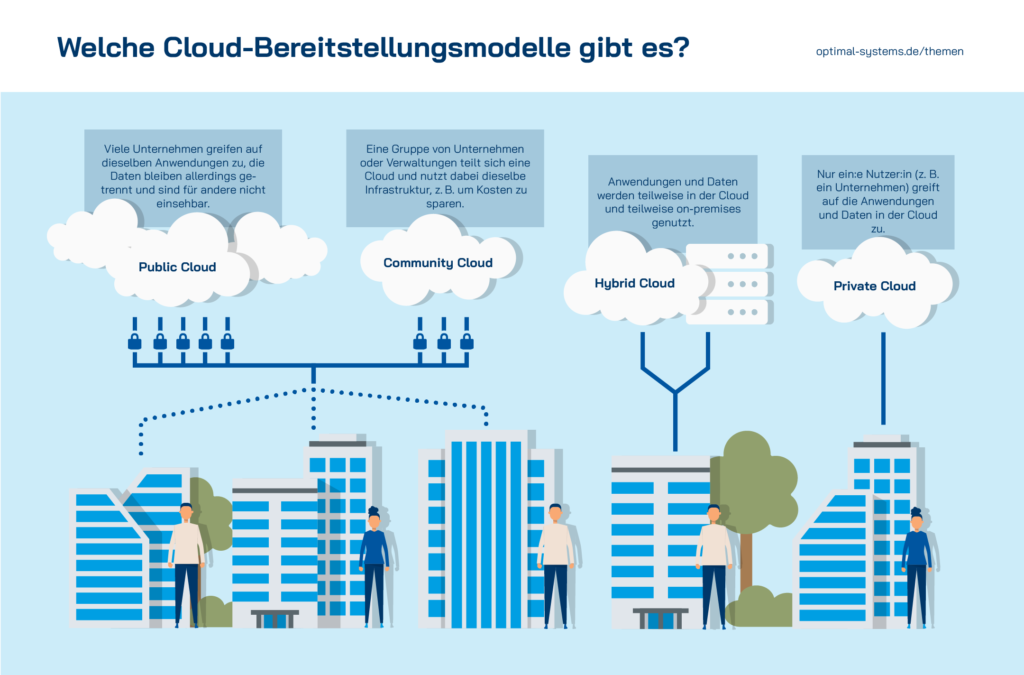
While cloud service models differ in terms of which services are offered via the cloud and how maintenance is divided between the provider and the user, cloud deployment models differ in terms of where the cloud is located and who manages it.
Learn more about the advantages and disadvantages of a public cloud, private cloud, and hybrid cloud, as well as possible use cases.
Cloud computing is not just interesting for startups. Large companies and corporations, as well as small and medium-sized enterprises (SMEs), benefit equally from the many advantages. Setting up or upgrading your own IT infrastructure is very costly and requires significant staff and maintenance resources. Furthermore, it is often difficult for many companies to estimate how much computing capacity they will need in the future. A fixed (in-house) infrastructure is often too small to support growth or oversized for actual needs. On-demand resource provisioning is one of the most important advantages of the cloud.
Cloud migration is the process of moving computing resources to a cloud computing environment. In most cases, resources are transferred from a local data center to a cloud provider.
The extent of the transition varies widely. This allows you to move certain areas to the cloud, for example, by migrating your human resources management to a SaaS solution. Or you can switch entirely to cloud native and take advantage of microservices, containers, orchestration, and automation. Which path is best for you depends on various internal and external factors.
Cloud migration refers to the process of moving some or all of your company's data and applications to the cloud. In the process, you will migrate your digital business processes from an on-premises or legacy solution to a private, public, or hybrid cloud. Migration to the cloud can also involve moving applications to a different cloud. In addition to an outdated legacy IT system that is no longer performing effectively, economic benefits are the driving force behind this move. Find out here what competitive advantages large companies, corporations, public institutions, and organizations – as well as small and medium-sized businesses – can expect from migrating to the cloud.
One of the most significant advantages of moving to the cloud is scalability: The cloud grows along with your business, adapts to your changing needs, and balances out peak loads without requiring you to actively scale resources up or down. If you wanted to handle seasonal spikes in demand using a local infrastructure, the local server would have to be designed for the maximum required capacity and would operate at overcapacity for most of the year. Cloud services, on the other hand, can be dynamically scaled up or down as needed.
Scalability is ensured by microservices, which form the foundation of a cloud-native environment. Unlike a monolithic system architecture, microservices are loosely coupled services that communicate and collaborate via defined interfaces. Microservice architectures operate according to an agile and flexible modular principle. Using APIs, an application can be continuously expanded with additional components.
Peak loads are balanced through what is known as elasticity: Every feature of a cloud-native application – such as the shopping cart or the login function in a website with an e-commerce system – is encapsulated in its own microservice and runs in its own virtual environment, called a container. If many users want to add products to their shopping carts at the same time, the monitoring system can simply create more containers with the appropriate functionality to process the requests. If there are fewer customers on the website again, the number of containers will be reduced. This ensures that only as many resources as are currently needed are allocated.
Ever since the COVID-19 pandemic, if not before, we have known how important it is to scale capacity flexibly in order to respond to volatile demand and thus keep costs under control. Regardless of pandemics, energy supply issues, or natural disasters, the cloud enables companies to flexibly meet their needs. If you experience rapid growth due to a new product, entry into a new market, or a merger, capacity can be expanded promptly.

By moving to the cloud, many companies can optimize their operational performance. No matter where your employees are located, they can access the data in real time. This allows you to connect with employees or customers in areas where you do not have a branch. Different time zones are just as irrelevant as distances. Your employees work flexibly – think “New Work” – and you can draw on the international expertise of teams regardless of their location. The saved files are always available online, which means you can access them from anywhere without having to install an application locally. This involves not only processing, storing, and archiving data (cloud storage and cloud archiving), but also improving operational efficiency through workflows and the automation of business processes.
Unlike setting up a physical IT architecture, which is time-consuming and resource-intensive, resources and applications are immediately available in the cloud. Updates, bug fixes, and new applications are also ready to use right away. Employees in the IT departments are primarily responsible for monitoring, rather than troubleshooting and maintenance. The resources freed up among employees and managers can be allocated to the core business (or to new projects), which improves the quality of processes and overall competitiveness.
Unlike building their own infrastructure, renting resources happens incredibly quickly, enabling companies to achieve a faster time to market. New applications can be added with a single click.
The security of business data is a top priority for every company. Unauthorized access to confidential data can lead to a significant loss of reputation and trust, and even to substantial financial losses. Data protection poses a major challenge not only for companies in the healthcare and financial sectors.
As an entrepreneur, CEO, or president, you need the following for your data
When IT emergencies occur on holidays or precisely when the staff members responsible are unavailable, it poses a major problem for the local IT infrastructure. Clouds, on the other hand, are monitored and maintained by the provider – 24/7, all year round. In the event of a server failure, data can be restored quickly thanks to built-in redundancy, failover, and automatic logging. Even if a laptop containing important data goes missing over the weekend, that data is not lost to the company. It is centrally backed up in the cloud.
Another important aspect of data security is protection against unauthorized access. To that end, most cloud systems offer data encryption. The data is encrypted either in the cloud itself or during transfer. Another way to ensure security is end-to-end encryption. The data is encrypted right on your device. Access by authorized users is often controlled through an IAM (Identity and Access Management) system. Multi-factor authentication and user access policies govern access and the associated permissions. Often, even complex compliance and governance requirements can be tailored to a company's specific needs. Regular system updates, firewalls, tokenization, and VPNs protect data against cybercrime.
When companies operate on-premises solutions, they incur capital expenditures for the purchase of hardware and software. In addition, space is needed for the data center and staff to handle day-to-day operations. A cost comparison between on-premises and cloud solutions shows that there are no upfront or ongoing costs, but instead monthly service fees (pay-as-you-go model). They thus replace (high) capital costs with predictable variable operating costs. The most significant cost advantage is that costs are incurred only for the portion of resources that is actually used; in other words, costs are based on the usage and utilization of cloud services, not on the initial investment.
Personnel costs for specialists in IT departments are reduced by outsourcing the management and procurement of many services. This allows internal employees to be assigned to other responsibilities in the company, which improves operational performance.

Content-centric applications in the cloud – with yuuvis® RAD (Image: dashboard)
If you are ready to move individual workloads or all your applications to the cloud, you should consider which approach is right for you. There is no one-size-fits-all solution for migration. Which format, or combination of formats, is right for you depends on your time and staffing constraints, your goals, and your budget.
Regardless of how many workloads and how much data you have, and which provider you prefer, here we provide an overview of the various options for migrating to the cloud.
Lift-and-shift refers to migration without modification, in which the infrastructure and application are moved from an on-premises solution to the cloud. All applications are migrated to the cloud as a whole. The architecture and functionality remain unchanged by the migration, so the lift-and-shift migration is completed very quickly. However, businesses are only making limited use of the cloud's potential: Monolithic architecture remains just as difficult to scale and just as vulnerable to outages in the cloud as it is in on-premises applications.
Advantages:
Disadvantages:
Suitability:
If you choose a lift-and-extend migration, your applications will be restructured during the migration to the cloud and adapted to the cloud provider's platform.
While replatforming involves optimizing only individual applications – namely, those that benefit most from running in the cloud – refactoring uses PaaS solutions and containers to restructure the code in order to harness the full potential of the cloud. This approach allows for the migration to be expanded step by step. However, this requires that your application can be migrated in modules, which is often not the case with legacy systems.
Advantages:
Disadvantages:
Suitability:
Advantages:
Disadvantages:
Suitability:
With the full rebuild approach, the entire application landscape is redesigned and redeveloped using cloud-native technologies and services. This migration strategy is very resource-intensive because rebuilding entire application landscapes from scratch is expensive and time-consuming.
Advantages:
Disadvantages:
Suitability:
Instead of moving all applications to the cloud, companies can view the cloud as an “extension”: Existing applications, such as Controlling or Treasury, remain in their current location (for example, a private cloud or on-premises data center), while new functions, such as CRM or areas involving extensive data processing like e-mail, are deployed in the public cloud.
Advantages:
Disadvantages:
Suitability:
Once you have decided on your path to migration, it is important to draw up a concrete plan. Develop a business case with a detailed timeline and deliverables plan, and involve the relevant employees from the very beginning. The following steps outline what is important in each phase.
The planning and assessment phase is all about examining your existing IT system architecture. Are there any outdated solutions that cannot be migrated? What interfaces do you have? Analyze technical, financial, organizational, and personnel factors. Who are the decision-makers? Which employees and stakeholders need to be included? Is there a time crunch? What kind of budget is possible?
Take a thorough approach to defining your goals. As a team, discuss the fundamental question of why you want to migrate to the cloud. What applications, databases, and infrastructure do you need? What would you like to move to the cloud? Document how processes and functions currently operate and how they should operate. What improvements would you like to see?
Users and traffic are another important aspect of planning. The requirements specification you develop for this purpose will help you later in selecting the right provider and partner. In the requirements specification, you can also set the guidelines that define the permissions for employees and departments. Security guidelines and GDPR principles are also taken into account here.
Share your migration plan with your team well in advance: When is the migration scheduled? Is any downtime expected? What changes will this bring for your employees and users? Set up a help desk so your team has a point of contact for emergencies or problems.

A cloud migration is a good opportunity to clean up server instances. Can you completely disable old versions or modules that are no longer needed? Are there any duplicate data entries? Consider setting up a backup and disaster recovery plan so that you can restore your data in case of an emergency. A test run is definitely recommended. Testing the migration can also help determine how long the data migration will take. You can start with the least complex applications and migrate the rest immediately afterward, or you can opt for temporary parallel operation for security reasons.
Be sure to test user acceptance as well. This allows you to verify that everyday tasks work for your users and prepares your team to work in the cloud.
Involve your employees early on. Even if specialists from the cloud provider are there to assist you, at least some of your employees should have cloud-related knowledge.
Once your data has been moved to the cloud, you should check to make sure everything is working properly. Ideally, you will have prepared guidelines and training sessions for your employees and set aside enough time for feedback and questions.
Once all issues have been resolved, questions have been answered, and things have settled down, you can turn your attention to further optimization. Either you have the necessary skills and resources yourself, you outsource these tasks to a managed services provider, or you share these responsibilities.
Everything related to digitization, technologies, and cloud solutions

The success of your move to the cloud depends not only on your financial and time resources, but especially on your migration team (skills and expertise) and your migration planning. In addition to general business risks, there are specific challenges associated with cloud migration that we would like to bring to your attention here.
A lack of strategic planning is very often to blame for the failure of cloud projects. Do not underestimate the scope of the project, and take the time to thoroughly explore cloud service and deployment models. Do not skip any steps just to save time, and be sure to consider the needs and concerns of your stakeholders when planning. A migration strategy should also include an exit strategy and measures to avoid vendor lock-in in order to remain flexible.
Make sure from the very beginning that your team has the necessary skills. Capabilities that were ideal for on-premises solutions are often insufficient for the cloud. Security, monitoring, and administration present IT teams with new challenges that require professional, technical, and legal expertise. To prevent knowledge gaps from arising due to changes in the job requirements for IT staff, you should consider early on whether and how your team needs further training, or whether you may even need to hire new employees. If your team's skill level is too low, you can strengthen your expertise and capabilities by drawing on the expertise of external providers.

Targeted search in a cloud environment: results of a document search in yuuvis® Momentum
Moving your business to the cloud has both direct and indirect effects on your workflows and your organization. A successful move to the cloud requires more than just your IT department; HR and financial planning must be just as closely involved as customer-facing teams and marketing. The migration will result in the creation of new infrastructure and the reorganization of processes, which will lead to changes in workflows. Involve all key project stakeholders from the very beginning, and ensure that communication and information sharing among all parties are ongoing, cross-functional, and transparent. That way, no employee feels overwhelmed. The more closely and the earlier your employees are involved in the migration, the more successful not only the migration itself will be, but also the better your company will be able to capitalize on the benefits – such as agility, scalability, cost savings, efficiency, and so on – after the migration.
Many IT teams undertake the migration on their own, even though they lack sufficient knowledge of cloud technologies. The consequences can range from serious problems to data loss. Just imagine the worst-case scenario: your data becoming accessible to (unauthorized) third parties due to poorly configured access rights or encryption errors. Similarly, a lack of security in user authentication or in public APIs can lead to data loss. Establish your basic security standards as early as the planning phase.
Even when the total cost of cloud migration is calculated, costs remain a major obstacle to a successful migration. For example, if you do not properly monitor the runtime and contract terms of the on-premises solution, you may incur additional costs in the long term alongside your cloud operations.
When planning your budget for cloud migration, it is very important to understand the criteria your chosen cloud provider uses to bill you for resource usage. That means: Plan as precisely as possible what cloud capacity you need to avoid unnecessary additional costs.
Unexpected costs often arise even with very fast and simple lift-and-shift cloud migrations. This approach often seems “convenient” because the data (supposedly) does not need to be modified. However, if you later realize that architectural adjustments for the cloud are indeed necessary, the actual costs can quickly exceed your planned budget.
The transition phase, in particular, can lead to unexpected costs in some cases, so you should monitor your workloads very closely during the migration phase. Do not keep your existing on-premises solution running any longer than necessary (exit strategy).
When you move to the cloud, you must comply with certain policies and compliance requirements, just as you would with on-premises data storage and processing. It is not the cloud provider, but you are responsible for complying with applicable regulations, such as the proper implementation of the GDPR. Use the legal framework for cloud computing and the IT-Grundschutz recommendations issued by the Federal Office for Information Security (BSI) as a guide.
Even if you use services and servers from providers in countries with less stringent data protection policies, data protection is still a major concern for you. In the U.S. and China, government agencies can access data stored there. To get around this, U.S. providers store the data of European customers within the EU. But even that is not a 100% legally sound solution, because U.S. companies are required to hand over data (including personal data) to government authorities upon request, even if those companies have a server located in the EU. The legal basis applicable to these servers (the U.S. Cloud Act—pursuant to the Patriot Act of 2001) and the European GDPR are in conflict.
A European cloud provider must comply with the GDPR requirements and, in the area of electronic communications, with the so-called e-Privacy Directive, which was transposed into German law through the Telecommunications and Telemedia Data Protection Act (TTDSG).
Another important aspect of data protection is to verify how and in what ways cloud providers collaborate with other sub-contractors. Always keep in mind that, as the owner of personal data, you are responsible for ensuring compliance with security and compliance requirements.
Find out here in detail how to implement GDPR-compliant cloud solutions.
If you look online for information about cloud computing providers, you will find that there are quite a few options available. Most providers offer a variety of services, and directly comparing them is not so easy.
In general, the offerings differ in terms of the services provided (IaaS, PaaS, SaaS) and their deployment models (public, private, hybrid, community cloud):
If you want to migrate your Microsoft or SAP workflow to a cloud for businesses, or move specific areas of your business, such as web applications, sales, or financial services, you will find many other options in addition to well-known cloud providers like Microsoft Azure, Amazon Web Services (AWS), Google Cloud Platform (GCP), IBM Cloud, and Alibaba Cloud.
You can manage the transition to the cloud with your own internal team, engage external partners (such as managed service providers) to assist you with the transition to the cloud and with cloud operations, or divide the tasks between the two.
If you decide to do everything yourself, you need to make sure you have the necessary skills and staff. This path is easier for corporations and large companies to follow than for small and medium-sized enterprises.
Managed services providers are external service providers that manage your cloud environment; in other words, managed services providers handle day-to-day operations, including cloud monitoring, for businesses. However, you can also delegate only certain areas. The scope of external services is typically defined in service level agreements (SLAs). Typical managed services include
Content and information management from the perspective of cloud computing refers to web-based services that help companies manage all types of content flexibly and quickly, regardless of time or location. In addition to document management (DMS) and digital archiving, cloud computing focuses on optimizing and improving business processes.
Learn more here about how to use content and information management on various cloud platforms that go beyond cloud storage: From cloud storage to information management in the cloud.
Information management in the cloud goes beyond the capabilities of cloud storage and moves toward “intelligent document storage.” Typical examples of this include categorizing and classifying files and using them in your day-to-day business operations as invoices, contracts, or personnel files. You can define metadata for each of these document types. For example, you can save an invoice not only under the customer's name and the project date, but you can also add descriptive attributes to it. You can use these attributes to quickly find and organize your documents, as well as assign access rights.
To learn how to manage billions of documents in your own system landscape—whether on-premises, in a private or public cloud, or in a hybrid model—visit Content repository: high-performance storage.
The German National Library (DNB) is the central archival library for all media works in the German language. Since 1913, the DNB has been archiving German-language media works in text, image, and sound. These include books, magazines, CDs, records, maps, and online publications. Additional holdings at the German Music Archive, the German Book and Writing Museum, and the German Exile Archive complement the collection. The total collection comprises over 43 million media works, including over 10 million online publications. Every year, there are about 3 million new additions. The more than 600 employees process over 700 orders per day. More than 7 million accesses to the digital tables of contents and 12 million accesses to the online publications demonstrate the high demand for information.
Requirement
The German National Library was looking for a lean and highly scalable repository. To manage library metadata and perform full-text searches, it uses tried-and-true systems that are impossible to replace; the organizational and financial burden would be enormous. What was needed, therefore, was a repository for providing objects that did not require its own user interface but instead connected to the legacy systems via API interfaces. Users should not notice that a new repository is running behind the scenes, except that access is now much faster. It was also necessary to be able to seamlessly handle as many file types as possible and very large amounts of streaming content, since the library also has videos in its collection.
Solution: a yuuvis® Momentum archiving system
The project began in 2020 and has been in trial operation since early 2022. Following extensive testing, the system is expected to go live in the fourth quarter of 2022 and take over the provision of digital publications in the DNB reading room. The operation of this National Library private cloud platform is managed by the Managed Services team at OPTIMAL SYSTEMS.
The benefits of yuuvis® Momentum by OPTIMAL SYSTEMS
This migration checklist clearly summarizes the steps involved in moving to the cloud:
Manage billions of documents in a single system landscape:
Experience the latest generation of content management!
Cloud migration is the process of moving computing resources, such as data, applications, and IT processes, to a cloud computing environment.
The key benefits of migrating to the cloud include scalability and elasticity, on-demand capacity utilization, flexibility and efficiency throughout the entire operational process, security and data protection, and cost savings.
There are many paths to the cloud. The three main types of strategies are: Lift-and-shift (rehosting) – in this process, your existing applications are migrated to a cloud server provided by an IaaS provider without any changes. Lift-and-extend – with replatforming, your applications are migrated to the enterprise cloud with only minor optimizations, whereas with refactoring, your application code is optimized more extensively using containers and PaaS solutions. Rebuild (redesign) – in this process, your applications will be redeveloped from the ground up using a PaaS architecture.
During the pre-migration phase, you assess your existing application and define your goals; during the migration, you manage the transfer; and during the post-migration phase, you optimize your operations in the new cloud environment.
To ensure that your journey to the cloud is a success, you should pay particular attention to the following five potential risks: Adequate, strategic planning; your team's cloud expertise; the need for change management; security gaps; hidden costs

LOCATIONS